Powiadomienie o plikach cookie!
Ta witryna internetowa korzysta z plików cookie. Pozostając na niej wyrażasz zgodę na korzystanie z cookie. Czytaj więcej na temat cookie ...
MiploSync
Use our services while traveling with AutoMapa!
Download MiploSync
MiploSync Installer
ver. 1.9.0.1
File size: 0 MB, last update:
22-IV-2011
Download the CAB installer:
CAB (0 MB).
Download MiploSync and use the services offered by the program. Download and update POI in AutoMapa, send new POI, use MiploLoc, MiploTraffic and other services. available during navigation* or
after you insert your device into the cradle*.
* - MiploSync requires a connection to the Internet.
See manual of installation, configuration and how to use MiploSync.
We recomend to create a new POI file after installation. It will prevent possible problems with synchronization.
The program requires installed AutoMapa in at least 4.1. version. You can download current version from AutoMapa website. Program can be installed only on PDA with Windows Mobile 2003, 5 or 6, PNA with Windows CE 5.0 Professional (depending on the implementation of the operating system by the manufacturer)and PC with Windows 2000, XP, Vista. More information.
Program functions
| Automatic synchronization |
 You can set the frequency of automatic synchronization.
 You can allow to synchronize after you insert the device into the cradle - in the case of devices using ActiveSync or Windows Mobile Device Center. |
|---|---|
| MiploLoc - vehicle location |
 Allows to send your vehicle location with selected frequency and share or invite user to wathc your location LIVE.
 The device requires a permanent connection to the Internet. Configuring the connection and the cost of Internet connection you can check with your Internet provider. |
| MiploTraffic - avoiding blocked sections |
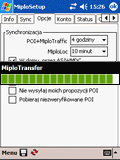
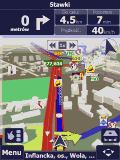 MiploSync will automatically download and block sections in categories: unbeaten track, traffic jams, road works, height and weight restrictions and others. Blocked sections are taken while routing in AutoMapa.
 You can select categories for MiploTraffic. |
| Download icons and warning sounds |
 Icons and sounds assigned to subscribed categories are downloaded automatically while synchronization.
 Icons and sounds are available directly in AutoMapa. POI are shown with selected icons and sounds are played with selected categories while warning. |
| Integration with AutoMapa |
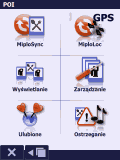 After you install the MiploSync in AutoMapa menu will appears on-screen buttons running synchronization and switching on/off MiploLoc.
 Buttons are available in Menu->POI. On some PNA devices buttons will stay inactive if MiploSync was installed on PC. |
| Synchronization in AutoMapa |
 During synchronization in AutoMapa progress bar will apear and inform you about synchronization progres.
 After completion file reorganization process will be started by AutoMapa. |
| Adding and modifying POI |
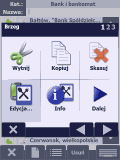 When you add a POI to category you subscribeit will be sent to our base and shared with other users. If you modify a POI proposed changes will be sent.
 We recommend you read our name and description rules for POI. |
| Status of last synchronization |
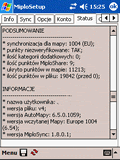 After synchronization you can check status of this process. You will get accurate information of sent POI, proposed changes, received changes etc.
 In your profile on Miplo website you can check the status of all synchronizations. |